Configure Azure personal access token
When installing the project for the first time, you need to run an initialization script (initYarnrc.sh or initYarnrc.ps1) with a personal access token.
Generating a Personal Access Token
To obtain <YOUR_PERSONAL_ACCESS_TOKEN>, follow these steps:
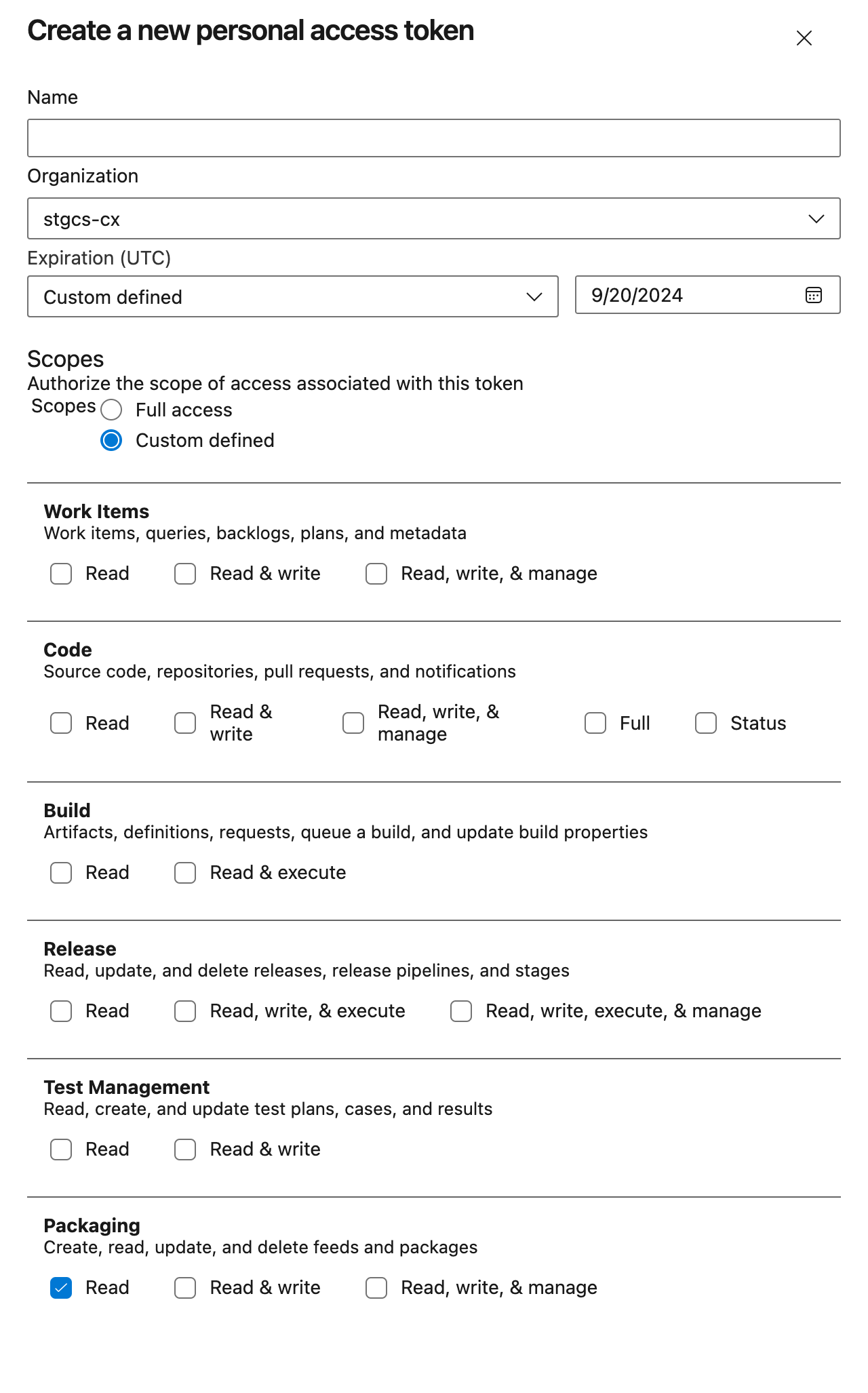
- Navigate to Azure DevOps Personal Access Tokens and create a new token.
- Set the expiration date as desired (custom range allows up to one year).
- Provide a meaningful name for the token.
- Assign at least the
Packaging = Readpermission. - Click Create.
Running the Initialization Script
Once you have your token, follow these steps:
- Copy your personal access token or save it in a file.
- Open your terminal and navigate to your project's folder on your machine .
For Windows (using PowerShell):
./initYarnrc.ps1 YOUR_PERSONAL_ACCESS_TOKEN
For Linux, WSL, or Windows (using Git Bash):
bash initYarnrc.sh YOUR_PERSONAL_ACCESS_TOKEN
You should see a message confirming that the .yarnrc.yml file has been created successfully.
Artifact Feed
The artifact feed is located inside the OnePortal project. You can access it here.
If you do not have access, please request it before proceeding.